Check an ad beside Save
Historical interface: the recordings and preview examples below predate the official API cutover. The current runtime uses official tokens and does not support provider preview. Follow current setup for sign-in, explicit token transfer and separate AI authorization.
Extension 1.5.0 adds Перевірити (Check) beside the native Save/Create button on supported Telegram Ads forms. Install or update the extension, then refresh the Telegram Ads tab so Chrome loads the new page integration.
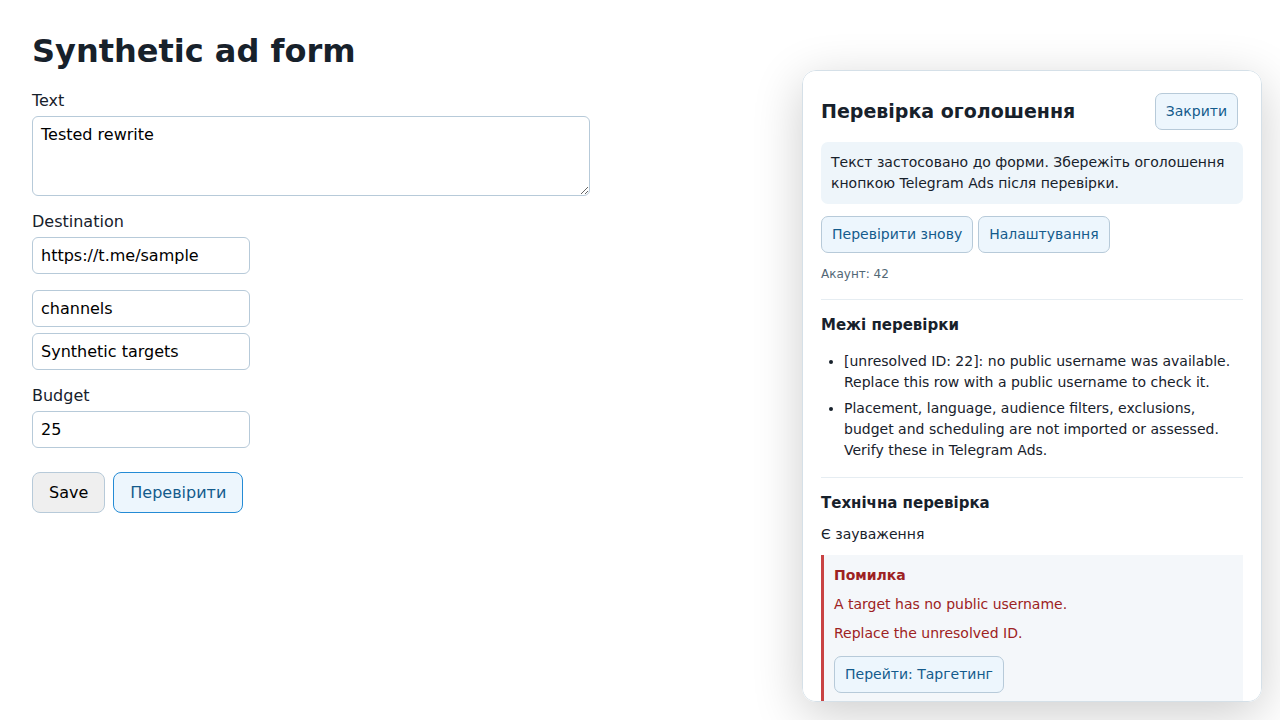
Example from the synthetic browser test; no real account or ad data is shown.
Check the current form
- In extension settings, save your API access, approve the assistant and select the connection/account matching the open Telegram Ads cabinet.
- Open a new ad or an existing ad's edit form. Click Перевірити next to Telegram's Save/Create button.
- A panel on the same page shows technical findings, target results and coverage gaps. Перейти focuses the relevant form field.
- Edit the form and click Перевірити знову. Changes invalidate the previous report, including changes while a request is still running.
The extension reads the current text, destination, selected public channel/bot targets and account identity. Version 1.5.1 also reads semicolon-separated target IDs from locked edit fields. If Telegram exposes IDs without public usernames, they remain visible as unresolved targets with an explicit coverage warning; this is a limit of the imported data, not evidence that the ad violates Telegram rules. Unresolved targets remain visible; unsupported targeting and unreadable fields produce coverage warnings. Media, audiences, exclusions, placement, language, budgets and schedules are not assessed. A clean technical result is not Telegram moderation approval.
If access is missing, expired or belongs to a different account, open Налаштування from the panel and correct the connection/account. The extension does not silently switch the saved account. Refreshing the panel's local form state does not invoke AI or send automatic preflight requests.
Review and apply an AI rewrite
- Choose Переглянути доступність AI and review the provider/model.
- Add optional product context and confirmed facts. Consent to one request for the displayed provider and current data.
- Choose Проаналізувати for analysis or Запропонувати варіанти for rewrites. Each request consumes consent; analysis does not automatically request rewrites.
- Compare До (Before) and Після (After), explanations and validation findings. Only usable variants offer Застосувати до форми.
- Applying a variant changes only the current form's text, then runs technical preflight once. Use Telegram's native Save/Create button yourself after reviewing the result.
From version 1.6.0, recognized custom-emoji markup is shown as its visible emoji in comparisons. Applying a usable rewrite preserves the original custom-emoji IDs; ambiguous mappings disable application. See custom emoji handling.
Editing the ad, context or facts invalidates the old AI result. Applying also rechecks the current ad, account, saved access and connection revision. A stale variant cannot overwrite newer text. Variants are temporary; after an extension worker restart or expiry, run a new AI request if you still need one.
If text application succeeds but the subsequent check fails, the panel says that text was applied and asks you to check again. It does not repeat the write automatically.
See AI text review and rewrites for model limitations, quotas and facts that still need human review. Using a variant on the separate options page changes only its workspace draft; Застосувати до форми in the ad-page panel is the explicit action that updates Telegram's form.
What remains under your control
The native Save/Create button remains available. The extension does not submit, activate or allocate a budget, and does not block saving because a check fails. Service settings stay on the options page; the toolbar popup retains status and the original promotional content.